Showing posts with label Social Media. Show all posts

Wednesday, 7 May 2014

The Three Most Efficient Mobile App Building Platforms Available Today. Build Your App Today!

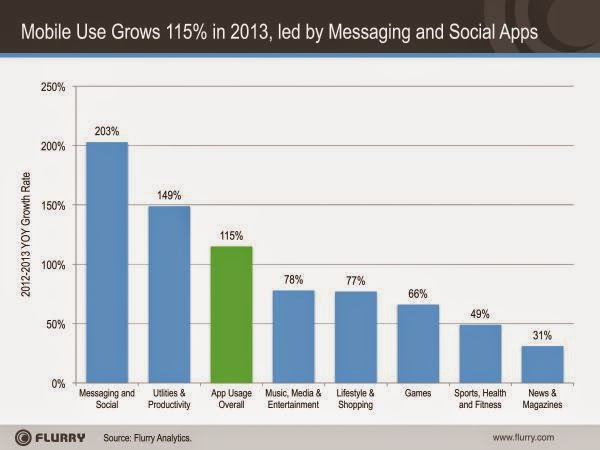
The apps business has finally come of age and this worldwide success story is now growing fast. According to Flurry Analytics, overall mobile application use in 2013 posted 115% year-over-year growth. As demonstrated in the chart below, every single app category has shown growth over the last twelve months.

Chart Illustrating Mobile Use Growth In 2013
Chart Source: Flurry
Facebook, combined with Twitter (1.5%) and Social Messaging apps (9.5%) grew to 28% of time spent on mobile, up from 24% last year, indicating the broader shift from socialising on Facebook to sharing within smaller, more private messaging applications.

Despite efforts from tech giants such as Google and Facebook, the market has not stabalised and over the past couple of years, we have seen new franchises emerge in almost every sector of mobile. These include applications like Pinterest, Snapchat, WhatsApp (acquired by Facebook), Waze (acquired by Google), Spotify and more, which on their own account for a percentage or two of the time spent on mobile.

So How Can You Go About Building Your Own Mobile Application? 

If you've ever wanted to build an app for your business, blog, product or service, until recently the whole process required heavy investment of both time and money.

The good news is that entering the mobile market no longer necessarily requires thousands of pounds and months of work. There are many mobile platforms available to help you build an app on a budget, quickly and with no coding knowledge required.

~ APPERY.IO 

~ Price: Free For Starters. Paid Options Range From $35-135 Monthly

Appery is a cloud-based mobile app builder that you can use to create apps for Android, iOS and Windows. Appery's builder runs using cloud technology which means that there is nothing to download or install. 

Appery includes a visual editor which allows you to drag and drop components to build the user interface which makes it simple - even for the 'non tech' minded. You can connect to any REST API and use it in your app, as well as instantly add a cloud database and backend to your app if you need to store data.


~ APPMAKR 

~ Price: Free For Starters. Paid Options Range From $1-$9 Monthly


Appmakr is the world's largest do-it-yourself platform for creating native mobile apps for IOS and Android devices as well as HTML mobile websites - with no coding.

Appmakr's platform uses RSS and API integrations to power the content in a creator's app. This content may include text, images, podcasts, audio and video. The platform also allows in-app HTML5 and CSS3 which means the app can access a phone's camera as well as other built in features.

Furthermore, Appmakr gives app creators the ability to customise the look of their apps by designing their icons, splash screens, headers and icons. If creators do not want to design graphics themselves, the database presents a database of icons to choose from.

~ MOBDIS

~ Price: Free 14 Day Trial. Paid Options Range From $28 Monthly - $350 Anually.
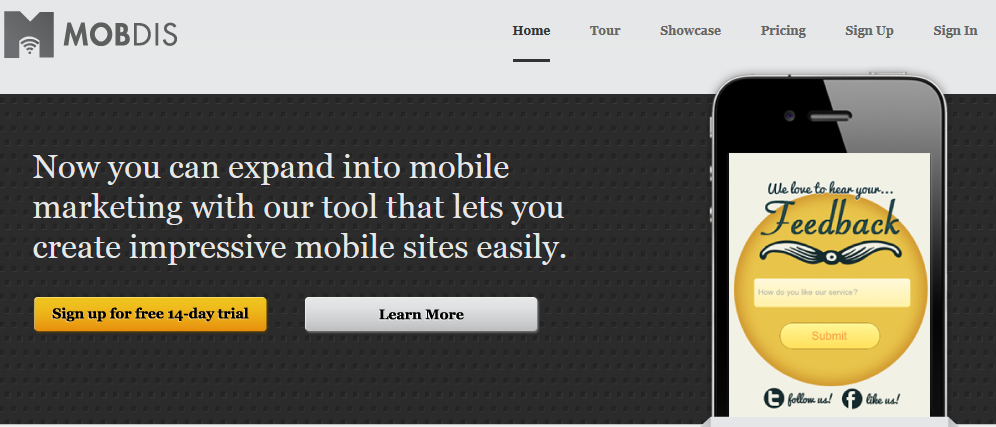
Mobdis Mobile App Builder


MobDis is a service that lets you build websites with a mobile-first approach. The application makes creating a mobile app feel like you are editing a Word document - starting from a plain white pag and building your masterpiece. MobDis breaks the constraints that many people feel when they look at their full site and wonder "how will we ever shrink this down to mobile size?" It encourages you to build from the ground up, thinking about the optimal content, functionality, and conversion actions for a mobile audience.

Once you've created your mobile site, MobDis gives you every possible option on how to display it. You can host it with MobDis on your own domain or on a subdomain on their website. You can also export your mobile site and move it to your own hosting environment. You can even publish it as an app and submit it to the Apple or Android app stores.

References

Appmakr, (2010). Build Your Own iPhone App for FREE w/ AppMakr - How To DIY. [video] Available at: https://www.youtube.com/watch?v=CHA30A8TLOQ [Accessed 7 May. 2014].

Ash, T. (2014). 7 Tools for Creating an Optimized Mobile Website. [online] Mashable. Available at: http://mashable.com/2014/02/05/7-tools-mobile-website/?utm_cid=mash-com-G+-main-link&utm_content=bufferf6272&utm_medium=social&utm_source=plus.google.com&utm_campaign=buffer [Accessed 7 May. 2014].

Bosomworth, D. (2014). Mobile marketing statistics 2014. [online] Smartinsights.com. Available at: http://www.smartinsights.com/mobile-marketing/mobile-marketing-analytics/mobile-marketing-statistics/ [Accessed 7 May. 2014].

Cohen, R. (2013). Build Your Own Web or Mobile App In Minutes With These Cloud Based Tools. [online] Forbes. Available at: http://www.forbes.com/sites/reuvencohen/2013/03/22/build-your-own-web-or-mobile-app-in-minutes-with-these-cloud-based-tools/ [Accessed 7 May. 2014].

Grace, S. (2013). 10 Excellent Platforms for Building Mobile Apps. [online] Mashable. Available at: http://mashable.com/2013/12/03/build-mobile-apps/ [Accessed 7 May. 2014].

Harjani, A. (2014). Just how big will the messaging app industry get?. [online] CNBC.com. Available at: http://www.cnbc.com/id/101474726 [Accessed 7 May. 2014].

Khalaf, S. (2014). Mobile Use Grows 115% in 2013, Propelled by Messaging Apps | Flurry. [online] Flurry.com. Available at: http://www.flurry.com/bid/103601/Mobile-Use-Grows-115-in-2013-Propelled-by-Messaging-Apps#.U2pc-1fvzIU [Accessed 7 May. 2014].

Perez, S. (2014). Mobile App Usage Increases In 2014, As Mobile Web Surfing Declines | TechCrunch. [online] TechCrunch. Available at: http://techcrunch.com/2014/04/01/mobile-app-usage-increases-in-2014-as-mobile-web-surfing-declines/ [Accessed 7 May. 2014].

Portioresearch.com, (2014). Mobile Applications Futures 2013-2017 Market Report - Portio Research. [online] Available at: http://www.portioresearch.com/en/major-reports/current-portfolio/mobile-applications-futures-2013-2017.aspx [Accessed 7 May. 2014].

Tuesday, 6 May 2014

Invaluable Benefits With These Five Twitter Tools To Improve Your Social Media Marketing Strategy


Twitter Bird With Twitter Sign


In the social media world, Twitter falls into the category of microblogging tools because of the short, disconnected messages it distributes. Twitter shares some features with the most common social media tools:

  • Facebook: A tweet is like a short Facebook status update.
  • Pinterest: Twitter allows you to share photographs and provide commentary.
  • LinkedIn: A tweet is like a short LinkedIn status update.
  • Google+: A tweet is like a short Google+ status update.
  • YouTube: A tweet can contain a link to a video. 
No one can beat Twitter for breaking coverage, the fast transfer of thought, and an endless supply of original content that's easy to consume on the go. Twitter will be – and already is – the only way for us all to stay relevant.

There are a vast number of useful tools available to improve aspects of your Twitter marketing strategy, here are my top five:

#1. SocialBro: Making Twitter Work Through Business

SocialBro comes with excellent analytics that give great insights not only about your marketing campaign, but also about your Twitter account and followers.


Screenshot Of SocialBro Website Page


Real-time Analytics gives you details of the people who are active users and have tweeted in real time which helps you determine the specific hour of the day when people are active. This is a quick way to know when you should be tweeting and is more relevant than depending on studies done by others, because it’s tailored specifically for you and your Twitter community.

Furthermore, SocialBro also gives you insights about your own Twitter account, as well as your followers. This information includes number of followers, nationality and language of followers, time zones that followers are in and much more. You can use this additional data to improve your Twitter marketing. You’ll have better insights about your followers, which means you can tailor your Twitter content to be more relevant to your community.

SocialBro can feel overwhelming and even downright frightening when you log in for the first time, as you’re bombarded with columns, graphs, and tools.  Thankfully, SocialBro eases the learning curve with video tutorials and helpful mouse-over pop-ups that offer explanations for each metric and tool. Finally, SocialBro is not compatible with other social media accounts outside Twitter. Then again, it’s not trying to be a complete social media management solution, so maybe this isn’t a true disadvantage!

#2. Twitonomy: Get An Overall View 

Twitonomy is quite a comprehensive twitter anlaytics tool that can be used to analyse your competitors accounts.  To run the tool just connect to your twitter account and then enter in your competitors twitter account to view a vast range of analytics.

Image Showing Twitonomy Dashboard
 
Twitonomy is an exceptional tool for benchmarking against competitors thanks to the detailed analysis it provides users, including:
  • Details on lists – You can view all the lists that your competitor are part of.  This can be useful to find other twitter followers you should engage with and also people that create the lists.
  • Overall statistics on the user – You can see how many tweets sent, the time of the day the tweets are sent, how often content is retweeted.
  • Most popular content – View the content that is retweeted the most and the tweets sent that were favorited the most.
  • Download and print tweets – If you want to do further analysis offline
  • Users most replied to and mentioned – You can find out who your competitor is mostly engaging with.
  • Hashtags used – find out the most common hashtags used by your competitor
 #3. TweetReach: How Far Has Your Tweet Travelled?


TweetReach helps you determine the reach of your tweets. All you have to do is insert the URL of your blog or any post and you’ll get information regarding the post.
TweetReach Report For 'Twitter Tools'
The data you recieve includes the tweet or URL's reach, amount of exposure, number of retweets and a list of contributors to the tweet. Not only do you get insights about influential users who have shared your article, but you also get a list of the top 50 people who shared your post or tweet.

You can do a variety of things with this information, such as add these influential users to a list and continue to build relationships with them, and thank them for sharing your tweets and more. TweetReach gives you the data you need to build a targeted network of people who share the same interests as you, which is invaluable to you and your business.


Image Showing FollowerWonk Dashboard
FollowerWonk allows you to analyse your optimal tweeting time in order to increase the influence of your tweets by showing you exactly when most of your followers will be online. This is important as it allows you to find, analyse and optimise for social growth.

#5. Goo.gl: URL Shortener

When using Twitter, everyone needs to use at least one URL shortening service in order to stay within Twitter's character limit. For this reason, a simple design and ease of use are essential; and Goo.gl offers just that.


Example of URL Statistics From Goo.gl


Goo.gl is a great tool that lets you track a number of valuable statistics including the number of people who are clicking on your links, the types of browsers people use to read your article, the country theyre from and the device or platform that they use.

This gives you insights not only about how effective your tweet is, but also about the demographics of your followers or people who are clicking your links.

------------------------------------------------------------------------------------------------------------

References

Cleary, I. (2013). Free Twitter Analytic Tools: The Ultimate Guide. Available: http://www.razorsocial.com/free-twitter-analytics/. Last accessed 6th May 2014.

Followerwonk.com, (2014). Followerwonk: Twitter analytics, follower segmentation, social graph tracking, & more. [online] Available at: http://followerwonk.com/ [Accessed 6 May. 2014].

Goo.gl, (2014). Redirecting. [online] Available at: http://goo.gl [Accessed 6 May. 2014].

Hines, K. (2013). 10 Twitter Tools Used by Social Media Experts. Available: https://blog.kissmetrics.com/10-twitter-tools/. Last accessed 6th May 2014.

Kingston, C. (2013). How to Use Twitter for Business and Marketing. Available: http://www.socialmediaexaminer.com/how-to-use-twitter-for-business-and-marketing/. Last accessed 6th May 2014.

Lee, A. (2012). 6 Twitter Analytics Tools to Improve Your Marketing. Available: http://www.socialmediaexaminer.com/6-twitter-analytics-tools/. Last accessed 6th May 2014.


SocialBro, (2014). SocialBro: The worlds #1 Twitter marketing platform - SocialBro. [online] Available at: http://www.socialbro.com/ [Accessed 6 May. 2014].

Tweetreach.com, (2014). How Far Did Your Tweet Travel? | TweetReach. [online] Available at: http://tweetreach.com/ [Accessed 6 May. 2014].

Twitonomy.com, (2014). Twitonomy: Twitter #analytics and much more.... [online] Available at: http://www.twitonomy.com/ [Accessed 6 May. 2014].

Widrich, L. (2013). How to Share Your Tweets at Optimal Times: Followerwonk and Buffer Team Up. Available: http://blog.bufferapp.com/optimal-best-time-to-tweet-followerwonk-buffer. Last accessed 6th May 2014.

Monday, 5 May 2014

Four Ways You Can Use Flickr To Improve Your Business And Increase Visibility

The Internet is the land of opportunity for small businesses; a virtual reality where a few dollars can go an incredibly long way for anyone looking to carve out a niche whilst being shadowed by deep-pocketed corporations.

Everyone knows about Flickr by now. The photo and video sharing community started up in 2004, was bought by Yahoo a year later, and has since grown into one of the biggest online communities in the world. Flickr boasts 50 million registered users and whilst it doesn't have the sheer size of Facebook, nor the rapid response of Twitter, it can be an equally (or even more) powerful tool to connect with and engage your customers. Why? Photography can open up whole new worlds.


Flickr Mobile Interface


Like any other social network, Flickr should not be considered a marketing platform. It's not a place to tout and sell products. It's a place that can help you develop your brand and get close to your customers. And most importantly, it's a place for them to interact with you and become a part of your brands experience.

Although you cannot use Flickr to advertise (emphasised consistently throughout their terms and conditions), this does not mean you cannot indirectly promote your business. Flat out advertising will see you kicked off the site in no time but if you want to promote your business, these four tips will help you do so within Flickr's rules, while improving your company's overall visibility.

#1. Reverse Marketing

In order to draw people on third-party sites to your Flickr page, embed the link in photos you use on blogs, share the photo on social media sites such as Facebook and Twitter, and connect other photography accounts with your Flickr account in the descriptions. This ensures that people viewing the photos have access to your other photos as well.

Flickr: Share This Via Pinterest

In addition to this you can use your Pinterest account to share these photos thanks to Pinterest's new feature which allows sharing from Flickr, whilst automatically offering proper credit and a link back to the original photographer.

Find out how to add Flickr images to your blog here.
Find out how to share Flickr images on Pinterest here.

#2. Tell Your Company's Story, Through Pictures.

Every brand has a story and Flickr presents you with an opportunity to share it with your customers, and more importantly, allow them to become a part of your journey. Flickr is particularly strong at telling stories visually, and the use of compelling photos that represent the identity of your company will allow you to illustrate where your company's roots are and where the company's headed.

Virgin Galactic Flickr Photostream
Flickr: Virgin Galactic

Furthermore, be sure to get your customers involved too! Have them submit their pictures interacting with your brand, and encourage them to talk to each other, and you, about it.

It is important to note that you only get 100MB of free storage on Flickr, and videos are only available for paying customers. There's also been some controversey because of Flickr taking down images due to 'questionable content', but dont let this put you off!

In order to make people talk to your brand, you have to make things personal. Your voice must be real, and human!

#3. Properly Tag and Organise Your Photos

A surprisingly common mistake people make is in tagging and grouping their photos. These little details make it more difficult for images to appear in search, consequently limiting exposure even when placed in correct groups. You have to ensure that you are putting precise and appropriate tags in each photo when you first upload them.

Adding Tags To Your Flickr Image
How To Tag Images On Flickr
When adding Tags, it is important to mention the pictures genre, mood and descriptive keywords in order to give a decent amount of search parameters for a user to find your pictures.

Although there are many ways to upload photos to Flickr, there is no way to batch download photos, even for paying members! Furthermore, you can only view photos in one size so it would be nice to see Flickr accomodate the use of different sized images.
 

Find out how to add descriptive and accurate titles and ALT tags here.

#4. Integrate Flickr Into Everything Your Doing On The Web

To get all the value you can out of Flickr, use it to connect with your other social media platforms. Make sure that each part of your digital network is linked, from your website to your blog to Facebook to Twitter to Flickr. Tell your customers that these places exist and encourage them to share content and interact with these pages.


Social Media Sharing Icons
Social Media Icons

At the same time, make sure that you are using each social channel for its strength. For example, if you have both a YouTube channel and a Flickr page, it's okay to post videos on Flickr, but keep it primarily focused on photos because thats the reason that people are going to your page. Beyond that, you can use Flickr as a resource for your other social channels!

A note to photographers and other users who upload batches of images - There's no way to give multiple images the same name so you'll end up spending lots of your time tagging each image! As well as this, Flickr does not allow you to control the images that are displayed on your start page, and the website often arranges them by upload date. Although some of you may find this useful in displaying new content, others of you may want to customise your profile which Flickr limits you to do!

#. Conclusion

People love Flickr for both its personal and professional use. For the average user, it has limitless potential for self promotion and sharing creative inspiration with others. For businesses, it is a social tool that can draw others to products and services through indirect marketing.

However you choose to use it, the usefulness of Flickr is undeniable! Start increasing your visibility using the four key points above, and begin reaping the benefits.

#. References

Bhasin, K. (2011). How To Use Flickr To Improve Your Small Business. Available: https://www.americanexpress.com/us/small-business/openforum/articles/how-to-use-flickr-to-improve-your-small-business/. Last accessed 4th May 2014.

Jones, H. (2012). A Simple Guide to Using Flickr to Improve your Business. Available: http://www.31days2.com/2012/04/11/a-simple-guide-to-using-flickr-to-improve-your-business/. Last accessed 4th May 2014.

Smarty, A. (2012). 5 Tips To Increase your Visibility On Flickr. Available: http://www.jeffbullas.com/2012/08/06/5-tips-to-increase-your-visibility-on-flickr/. Last accessed 4th May 2014.

Wednesday, 16 April 2014

4 Reasons Why Your Business Needs Twitter


Social media has transitioned into a way of life for online culture; changing the ways in which we communicate, share content and educate ourselves. As social media continues to grow in almost every market, the utilisation of companies such as Facebook, Twitter, LinkedIn and Google+ has been immense. 

1.23 billion active monthly users

The numbers associated with social media channels speak for themselves. In 2013 93% of marketers used social media for business purposes, and 70% of marketers have used Facebook to successfully gain new customers. Furthermore, with 1.23 billion active monthly users, Facebook remains the largest online social network.

Twitter have 241 million monthly active users; up only 9 million from their previous quarter and a far cry from Facebooks 1 billion users . That's much less than Twitter expected as CEO Dick Costolo anticipated having double that amount of users by 2014. As a result, Twitter shares are down 23% after the companies reported loss of £396m ($645m).

But how important is Twitter for the future of social media, e-communication and business?

In my opinion, Twitter is the most important consumer facing company around at the moment, and with little doubt, I can confidently say that I can see it outlasting Facebook. With over 240 million users and half a billion tweets a day, the growth potential is tremendous.

Saudi billionaire Price Alwaleed invested $300 million in Twitter in 2011, and recently told Reuters that he doesn't plan to sell a single share.

Four Reasons Why You Need A Twitter Account For Your Business

1) Twitter is the fastest way for news to spread 


Twitter allows you to reach your followers immediately through your Twitter feed, and anyone who checks their feed will see your tweets immediately. This is an indispensable tool for providing breaking developments, new products and services, and up to date coverage of live events.

2) Instant Feedback

As you are probably aware, the communication on Twitter is open for everyone else to follow and encourages others to get involved. For this reason Twitter is valuable for both broadcasting and communicating in business; and a great customer service network can be developed by responding to customer complaints and answering questions.

3) Increased Traffic


Generating as much traffic as possible is one objective for every organisation and Twitter helps companies do that! Through making site links present, and diversifying content, Twitter is indispensible in helping to deliver bursts of traffic following content updates.

4) There is a direct correlation between following on Twitter and sales
  • 77% of top 100 companies are on Twitter
  • 70% of small businesses are on Twitter
  • 33% of Twitter users follow a brand
  • In the last two years there has been a 663% increase in users asking for business recommendations
  • 50% of shoppers have made purchases based on recommendations found through a social network
  • 79% of Twitter users are more likely to recommend brands they follow
  • 67% of Twitter users are more likely to buy from brands they follow

Further Reading:


Boesler, M. (2014). Twitter Shares Fell 24% After Earnings. Available: http://www.businessinsider.com/twitter-is-getting-annihilated-2014-2. Last accessed 16th April 2014.


Fredrick, H. (2012). Why Is Twitter Important?. Available: http://yourbusiness.azcentral.com/twitter-important-5023.html. Last accessed 16th April 2014.

Jones, K. (2013). The Growth of Social Media v2.0. Available: http://www.searchenginejournal.com/growth-social-media-2-0-infographic/77055/. Last accessed 16th April 2014.


Prager, D. (2013). Twitter for Business: Why It’s More Important Than Ever . Available: http://blog.rivaliq.com/twitter-for-business-why-its-more-important-than-ever/. Last accessed 16th April 2014.